Moose Security System Operating Instructions
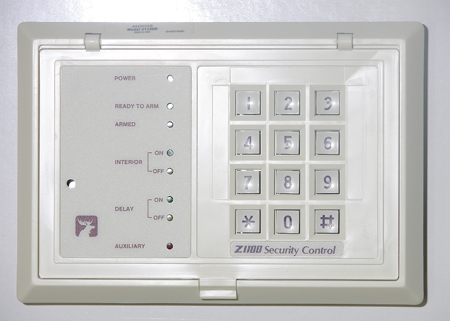
Older Style: Z1100R LED Keypad 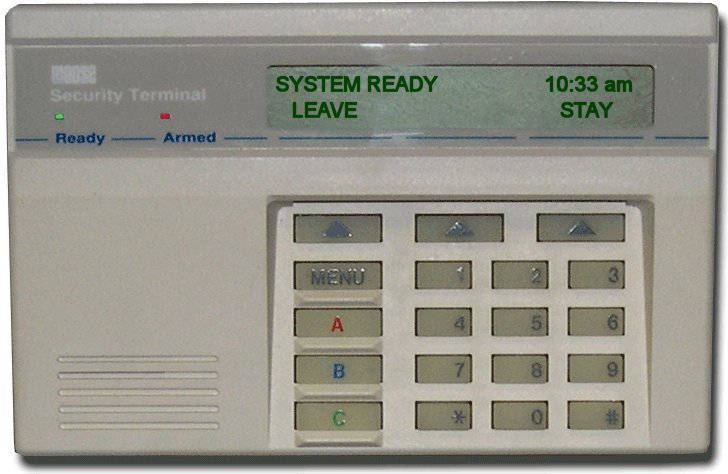
Newer Style: Z1100ST LCD Keypad |
Arming the SystemTo arm your Moose security system (e.g., Z900, Z1100, Z1100e):
The "Armed" light turns on, and an exit delay (30-60 seconds) begins. Exit before it ends; keypads may beep faster in the last 10 seconds. Older Keypads (e.g., Z1100R): Use numeric codes only. Newer Keypads (e.g., Z1100ST): May have [STAY]/[AWAY] buttons; LCD shows "Armed Stay" or "Armed Away." |
Disarming the SystemTo disarm:
Disarm within the entry delay (e.g., 30 seconds) to avoid an alarm. Older Keypads: Use [CODE] + [1]. Newer Keypads: [DISARM] + [CODE] option available if programmed. |
|
Arming Modes Breakdown
Older keypads show "Armed" LED; newer LCDs display mode (e.g., "System Armed Stay"). |
Quick Arm Instructions with Dedicated ButtonsIf enabled (primarily newer keypads):
Older keypads: Press [2] (Away) or [3] (Stay) if quick arm enabled. Verify with installer. Newer Keypads (e.g., Z1100ST): Feature dedicated buttons. Older Keypads (e.g., Z1100R): Numeric quick arm only. |
Bypassing ZonesTo bypass a zone while disarmed:
Caution: Bypassing reduces security, especially entry/exit zones in Away mode. Older Keypads: LED indicates bypass. Newer Keypads: LCD shows "Zone XX Bypassed." |
Enabling ChimeTo toggle chime (alerts for zone openings when disarmed):
Useful for monitoring without arming. Older Keypads: [*][9] only. Newer Keypads: [CHIME] button option. |
Changing CodesTo change a user code (master code required):
Test new codes. Default master: 1245 (Z900) or 1234 (Z1100). |
Reviewing FaultsTo check faults:
Ensures readiness before arming. |
Resetting the SystemTo reset after alarms or faults:
Contact installer if reset fails. |
Troubleshooting TipsCommon issues:
See manual for model-specific details. |
Bypassing Effectiveness & CautionsBypassing allows arming but compromises security:
|
|