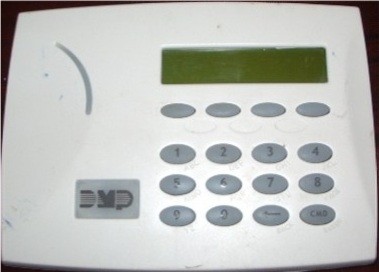
|
Arming the System
To arm your DMP security system, enter your 4-digit user code followed by an arming option:
- Home Mode: Press [CODE] + [1]. Arms perimeter only; interior zones bypassed for staying home.
- Sleep Mode: Press [CODE] + [2]. Arms perimeter and some interior zones (e.g., excluding bedrooms).
- Away Mode: Press [CODE] + [3]. Arms all zones (perimeter and interior) for full protection when leaving.
The "Armed" light illuminates, and an exit delay (typically 30-60 seconds) begins. Exit before it ends.
|
Disarming the System
To disarm the system:
- Enter your 4-digit user code + [CMD].
- The "Armed" light turns off, and any entry tone stops.
- If an alarm occurred (flashing "Armed" light), leave immediately and contact your alarm company from a safe location.
Disarm within the entry delay (e.g., 30 seconds) to prevent an alarm.
|
Arming Modes Breakdown
- Home: Perimeter protection only; interior sensors off. Ideal for nighttime or when occupants are home.
- Sleep: Perimeter plus select interior zones armed (e.g., basement, excluding sleeping areas). Balances security and movement.
- Away: Full protection; all sensors active. Use when the premises are unoccupied.
The keypad displays the mode (e.g., "System On - Away") after arming.
|
Quick Arm Instructions
If enabled, arm without a code:
- Press [1] for Home mode.
- Press [2] for Sleep mode.
- Press [3] for Away mode.
- Disarming requires a valid code.
Check with your installer if Quick Arm is active; useful for temporary users.
|
Bypassing Zones
To bypass a zone (e.g., a faulty sensor) while disarmed:
- Press [BYPASS], enter your code (if prompted), then enter the 2-digit zone number (e.g., [0][5] for zone 5).
- Press [CMD]. The "Bypass" light illuminates, and the zone is skipped when arming.
- Bypasses clear upon disarming unless manually set again.
Caution: Bypassing reduces security effectiveness, especially entry/exit zones in Away mode.
|
Enabling Chime
To toggle chime (alerts for door/window openings when disarmed):
- Press [CHIME] or [*][7].
- "Chime On" displays, and the chime light activates. Repeat to turn off.
- Audible alert (ding-dong) sounds when a monitored zone opens.
Enhances awareness without arming the system.
|
Changing Codes
To change a user code (master code required):
- Press [*][5], enter [master code].
- Enter the 2-digit user number (e.g., [0][2] for user 2).
- Enter the new 4-digit code, then [CMD].
- To delete, enter [*][*][*][*] instead of a new code.
- Press [#] to exit.
Test the new code immediately to confirm.
|
Reviewing Faults
To check faulted zones:
- If "System Not Ready" displays, press [*] to view faulted zones (e.g., "Zone 05 Open").
- Use [^][v] scroll keys to browse faults.
- Resolve (e.g., close door) or bypass, then press [#].
Ensures all zones are secure before arming.
|
Bypassing Effectiveness & Cautions
Bypassing allows arming despite faults but impacts security:
- Bypassed zones are unprotected, increasing vulnerability.
- Avoid bypassing entry/exit zones in Away mode, as this negates perimeter protection when absent.
- Use bypassing as a temporary fix; address faults promptly via your installer.
- Test the system monthly to ensure all zones function (notify monitoring center first).
|