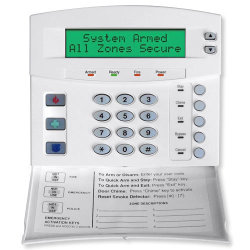
|
Arming in AWAY Mode
Use AWAY mode when leaving the premises for full interior and perimeter protection:
- Step 1: Close all doors and windows. The "Ready" light must be on or flashing (force armed). If off, see "Making Your System Ready to Arm."
- Step 2: Enter your 4- or 6-digit code. The "Armed" and "Exit" lights illuminate, starting the exit delay (typically 30-60 seconds, depending on programming).
- Step 3: Leave the building before the delay ends. The "Exit" light flashes rapidly in the last 10 seconds as a warning.
Important: If more time is needed, disarm with your code and rearm.
|
Arming in STAY Mode
Use STAY mode when staying inside, arming only the perimeter:
- Step 1: Close all doors and windows. "Ready" light must be on or flashing.
- Step 2: Enter your code (optional if programmed).
- Step 3: Press [STAY]. The "Stay" light illuminates, bypassing interior zones.
- Step 4: Press [STAY] again to toggle to "Instant" mode (no entry delay).
If "Auto Bypass" is enabled, interior zones bypass automatically if no exit occurs. If "Auto Instant" is enabled, entry/exit doors become instant if no exit is detected.
|
Making Your System Ready to Arm
If the "Ready" light is off or flashing:
- Use the [^] [v] scroll keys to identify faulted zones (e.g., open doors).
- Press [BYPASS] while the zone is displayed to bypass it, then press [#] to return.
- If "System Not Ready," press [4] for help (if programmed).
- If the "Power" light is off, check AC power and restore if possible; otherwise, contact your installer.
Resolve faults or bypass zones to arm the system.
|
Disarming the System
To disarm upon entry:
- Step 1: Enter through a designated entry/exit door; a tone sounds during the entry delay.
- Step 2: Enter your code. The "Armed" light turns off, and the tone stops.
Caution: If the "Armed" light flashes during entry, an alarm occurred. Exit immediately and contact your alarm company/police from a safe location.
|
Quick Arm
If enabled, arm without a code:
- Press [EXIT] for AWAY mode.
- Press [STAY] for STAY mode.
- Disarming still requires a valid code.
Ideal for temporary users (e.g., maids, babysitters).
|
Changing Modes While Armed
Adjust settings while armed (if programmed):
- Press [STAY] to toggle entry/exit delay ("Instant" toggles on/off).
- Press [BYPASS] to toggle interior zones (if enabled).
- Press [EXIT] to start an exit delay for leaving.
Warning: If "Instant" is on and you re-enter, an alarm triggers unless [STAY] is pressed again.
|
Bypassing Zones
Bypass zones while disarmed:
- Procedure 1 (Known Zone): Press [BYPASS], enter code (if required), enter zone number (e.g., [0][6] for zone 6), press [BYPASS] again. Repeat for other zones, then press [#].
- Procedure 2 (Unknown Zone): Press [*][^], scroll with [^][v] to find the zone, press [BYPASS], then [#].
- Group Bypass: Press [BYPASS][0][BYPASS] to bypass all designated group zones.
Caution: Bypassing reduces protection. Avoid bypassing entry/exit zones when leaving.
|
Emergency Activation Keys
Hold for 2 seconds (if programmed):
- Fire: Triggers fire alarm, reports to monitoring center.
- Auxiliary: Signals medical/other emergencies.
- Police: Sounds local alarm (or silent if programmed), reports to center.
Use only in emergencies requiring immediate response.
|
Changing User Codes
Requires master code:
- Press [*][5], enter [master code].
- Enter 2- or 3-digit user number (e.g., [0][0][4] for user 4).
- Enter new 4- or 6-digit code. To delete, enter [*][*][*][*] or [*][*][*][*][*][*].
- Repeat for other users, press [#] to exit.
If rejected (e.g., duplicate), the keypad beeps 3 times.
|
Setting Keypad Tone
Adjust keypad sound:
- Press [*][0] to enter "Adjust Tone" mode.
- Use [^] to raise tone, [v] to lower.
- Press [#] to save and exit.
Customize for audibility preference.
|
Chime Feature
Toggle door chime (alerts for door/window openings):
- Press [CHIME]. "Chime" light on = active; off = inactive.
- Produces a ding-dong sound when toggled.
Useful for monitoring entry while disarmed.
|
Viewing Alarm Memory
Check recent alarms:
- Press [*][3].
- Scroll with [^][v] to view zones that triggered the last alarm.
- Press [#] to exit.
Helps identify past security breaches.
|
Additional Features & Cautions
Enhance system use with these tips:
- Test Function: Press [*][4][4] for battery/siren tests (if programmed). Enter code to silence siren.
- Cancel/Abort: If enabled, press [code] + [CANCEL] during abort delay to stop reports.
- Partitioned Systems: Use [*][1] for Master Mode to manage multiple areas (if applicable).
- Avoid excessive bypassing to maintain full protection.
- Test monthly: Arm, trigger a sensor, and disarm (notify monitoring center first).
|