|
Arming the System
To arm your Acron Avenger alarm system:
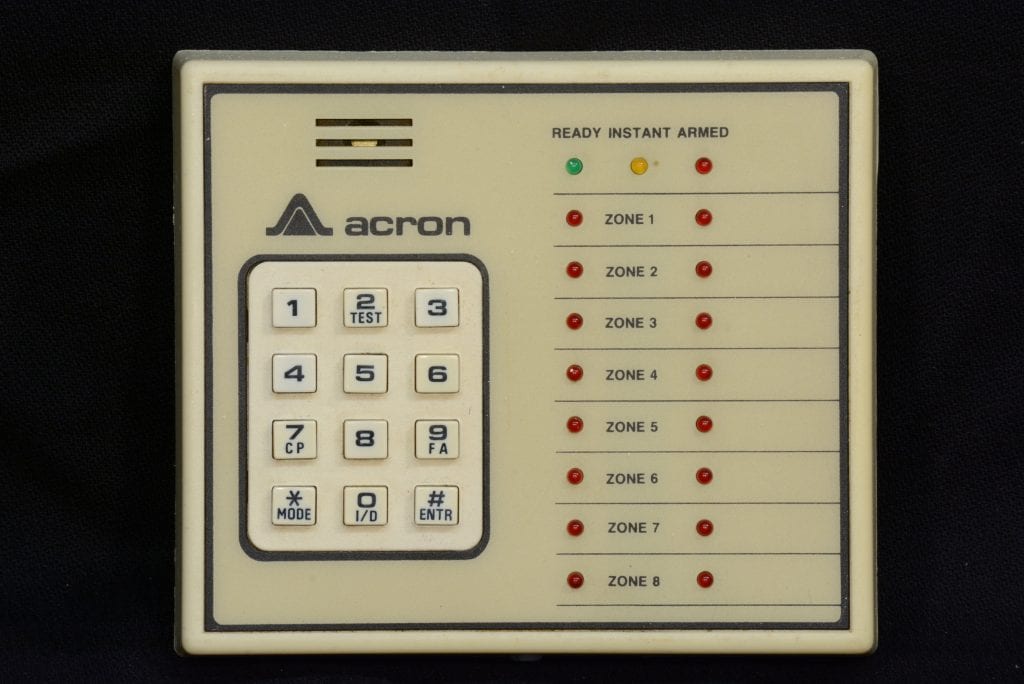
- Enter your 4-digit code followed by the [#] button.
- The system will arm in the default mode (typically full protection with an exit delay).
- Listen for a confirmation beep from the keypad and ensure the "Armed" indicator lights up.
Ensure all protected doors and windows are closed before arming to avoid faults.
|
Disarming the System
To disarm the system:
- Enter your 4-digit code followed by the [#] button.
- The keypad will beep once, and the "Armed" indicator will turn off.
- If an alarm has occurred, repeat the disarm process to clear the alarm memory.
Disarming must be done within the entry delay period (if set) to prevent the alarm from sounding.
|
Bypassing Zones
To bypass a specific zone (e.g., a faulty sensor or an open window):
- Enter your 4-digit code + [zone number] (e.g., 01, 02) + [#].
- The keypad will display a bypass confirmation (e.g., "BYPASS ZONE 01").
- Arm the system as usual; the bypassed zone will remain unprotected.
Caution: Bypassing zones reduces security. Avoid bypassing entry/exit zones when leaving the premises, as it leaves vulnerabilities.
|
Instant Arming
To arm the system without an exit or entry delay:
- Enter your 4-digit code + [*] + [0] + [#].
- The system arms immediately, and any triggered sensor will sound the alarm without delay.
- Use this mode when no one will be entering or exiting the protected area.
Ideal for nighttime use or when all occupants are inside.
|
Reprogramming Your Code
To reprogram your code (requires access to the control panel):
- Locate the Acron Avenger control panel, typically in a basement, utility room, or closet.
- Open the control panel door using a key or by removing screws (consult your installer if locked).
- Find the black reset switch at the bottom center of the panel.
- Slide the switch down and hold it for 5 seconds to enter programming mode.
- Go to each keypad, enter your new 4-digit code, and press [#].
- Wait 60 seconds for the system to save the new code.
- Test the new code at each keypad by arming and disarming.
If the code doesn’t work, repeat the process or consult your installer.
|
Checking System Status
To check for faults or system status:
- Look at the keypad display. If it shows "NOT READY," a zone is faulted (e.g., an open door).
- Press [*] to view the faulted zone number.
- Resolve the issue (e.g., close the door) or bypass the zone before arming.
Regularly check the system to ensure all zones are operational.
|
Additional Tips & Cautions
Maximize the effectiveness of your Acron Avenger system with these tips:
- Test your system monthly by arming it and triggering a sensor (notify your monitoring service first).
- Avoid frequent bypassing, especially of entry/exit zones, as it compromises security when armed.
- Keep the control panel location confidential to prevent tampering.
- If the keypad beeps continuously, it may indicate a low battery or system fault—contact your installer.
|