GE Security System Operating Instructions
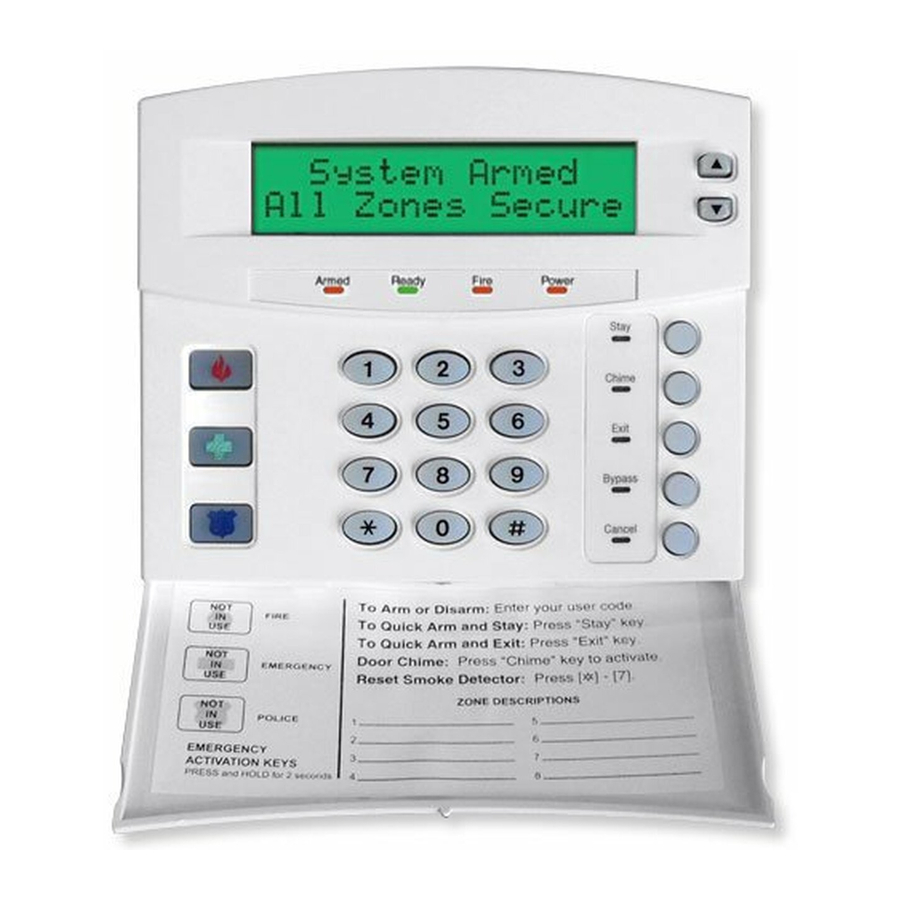
GE NX-148E Keypad

Arming the System

To arm your GE Security system (e.g., NetworX NX-4, NX-8):

  • Stay Mode: Press [CODE] + [3]. Arms perimeter zones; interior zones bypassed for staying home.
  • Away Mode: Press [CODE] + [2]. Arms all zones (perimeter and interior) when leaving.

The "Armed" light turns on, and an exit delay (typically 30-60 seconds) begins. Exit before it ends; the keypad may beep rapidly in the last 10 seconds.

Disarming the System

To disarm:

  • Enter your 4-digit code + [1] (OFF).
  • The "Armed" light turns off, and entry tones stop.
  • If "Armed" flashes upon entry, an alarm occurred—exit and contact your alarm company.

Disarm within the entry delay (e.g., 30 seconds) to avoid an alarm.

Arming Modes Breakdown

  • Stay: Perimeter protection only; interior sensors off. Ideal for occupants staying inside.
  • Away: Full protection; all sensors active. Use when the premises are unoccupied.

Keypad displays "Armed Stay" or "Armed Away" (e.g., NX-148E LCD models).

Quick Arm Instructions

If enabled, arm without a code:

  • Press [2] for Away mode.
  • Press [3] for Stay mode.
  • Disarming requires a valid code.

Verify with your installer if Quick Arm is active (common on NetworX series).

Bypassing Zones

To bypass a zone while disarmed:

  • Press [BYPASS] or [*][6], enter your code, then the 2-digit zone number (e.g., [0][5] for zone 5).
  • Press [#]. "Bypass" light illuminates, and the zone is skipped when armed.
  • Bypasses reset upon disarming.

Caution: Bypassing reduces security, especially entry/exit zones in Away mode.

Enabling Chime

To toggle chime (alerts for zone openings when disarmed):

  • Press [*][7] or hold [CHIME] (if available).
  • "Chime On" displays or a tone confirms; repeat to turn off.
  • Sounds when monitored zones open.

Useful for tracking activity without arming.

Changing Codes

To change a user code (master code required):

  • Press [*][5], enter [master code].
  • Enter 2-digit user number (e.g., [0][2] for user 2).
  • Enter new 4-digit code, then [#].
  • To delete, press [*][5][master code][user number][*][#].

Test new codes to confirm functionality.

Reviewing Faults

To check faults:

  • If "Ready" light is off, press [*] to view faulted zones (e.g., "Zone 05 Open").
  • Scroll with arrow keys (if available, e.g., NX-148E) or note zone numbers.
  • Resolve (e.g., close door) or bypass, then [#].

Ensures all zones are secure before arming.

Bypassing Effectiveness & Cautions

Bypassing allows arming despite faults but compromises security:

  • Bypassed zones are unprotected, increasing vulnerability.
  • Avoid bypassing entry/exit zones in Away mode, as it negates perimeter protection when absent.
  • Use temporarily; contact your installer for permanent fixes.
  • Test monthly: Arm, trigger a zone, disarm (notify monitoring first).