|
Arming the System
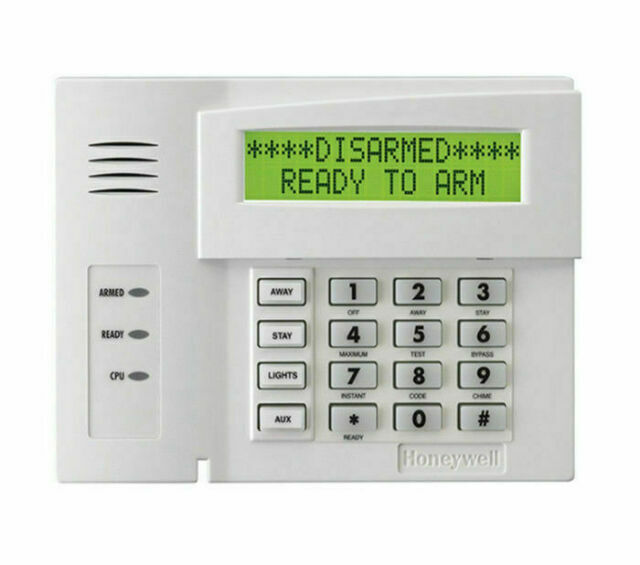
To arm your Honeywell Vista 20 system, enter your 4-digit security code followed by the desired arming mode key:
- AWAY Mode: Press [CODE] + [2]. Arms all sensors (motion detectors, doors, windows). Exit delay begins.
- STAY Mode: Press [CODE] + [3]. Arms perimeter sensors only (motion detectors off). No exit delay needed.
- INSTANT Mode: Press [CODE] + [7]. Arms perimeter sensors instantly, no entry delay.
- MAX Mode: Press [CODE] + [4]. Arms all sensors instantly, no entry delay.
|
Disarming the System
To disarm the system:
- Enter your 4-digit security code followed by [1] (OFF).
- The keypad beeps once, and the armed light turns off.
If an alarm has occurred, disarm again to clear the memory of alarm display.
|
Arming Modes Breakdown
- AWAY: Full protection; all sensors active. Use when leaving the premises. Exit delay allows time to leave.
- STAY: Perimeter protection; motion detectors off. Use when staying home.
- INSTANT: Perimeter protection with no entry delay. Alarm triggers immediately if a sensor is tripped.
- MAX: Full protection with no entry delay. Immediate alarm if any sensor is tripped.
|
Quick Arm Instructions
For faster arming without entering a code (if enabled by installer):
- Press [#] + [2] for AWAY mode.
- Press [#] + [3] for STAY mode.
- Note: Quick Arm may not allow disarming without a valid code.
|
Bypassing Zones
To bypass a zone (e.g., a faulty sensor):
- Enter [CODE] + [6] + [2-digit zone number] (e.g., 01, 02).
- Keypad displays "ZONE BYPASSED" when armed.
- Bypass is cleared when the system is disarmed.
Caution: Bypassing reduces system effectiveness. Avoid bypassing entry/exit zones in AWAY mode, as this compromises security.
|
Enabling Chime
To enable/disable chime (alerts when doors/windows open while disarmed):
- Enter [CODE] + [9].
- Repeat to toggle off. Keypad displays "CHIME" when active.
|
Changing Codes
To change the master code (only the master user can do this):
- Enter [CURRENT MASTER CODE] + [8] + [02] + [NEW CODE] + [NEW CODE AGAIN].
- Keypad beeps once to confirm.
To add a user code:
- Enter [MASTER CODE] + [8] + [2-digit user number (03-48)] + [NEW USER CODE].
|
Reviewing Faults
To view faulted zones:
- Press [*] when "NOT READY" is displayed.
- Keypad scrolls through faulted zones (e.g., "CHECK 05" for zone 05).
- Fix the issue (e.g., close a door) or bypass the zone.
|
Bypassing Effectiveness & Cautions
Bypassing zones allows the system to arm despite faults, but it diminishes security:
- Bypassed zones are unprotected, leaving potential entry points vulnerable.
- Avoid bypassing entry/exit zones in AWAY mode, as this defeats the purpose of perimeter protection during absence.
- Use bypassing sparingly and address faults promptly for full system effectiveness.
|